Skip to content

Your Business Calls Answered. Every Time.

An AI-powered phone receptionist that picks up 24/7, routes callers to the right person, takes messages, schedules appointments, and answers questions about your business. Set up in under 30 minutes.

"How can I help you today?" "Connecting you to Sarah now." "I'll take a detailed message."
SOC 2 Compliant
Setup in Under 30 Min
1.8s Median Response
24/7 Availability
7-Day Free Trial

AI Receptionist Features

Everything you need to handle business calls professionally, without the overhead of a traditional phone system.

24/7 Call Answering

AI picks up every call instantly with a custom greeting in a natural-sounding voice. No voicemail, no ringing out. Day, night, weekends, holidays.

Intelligent Contact Lookup

Callers say a name and the AI finds the right person using fuzzy matching across names, aliases, and departments. Even misspelled or partial names resolve correctly.

Real-Time Slack Routing

The AI sends an instant Slack DM with Accept and Decline buttons while the caller waits. Your team decides in real time whether to take the call, from anywhere.

Structured Message Taking

After every call, AI extracts five structured fields: caller name, reason, callback number, message, and intended contact. Phone numbers normalized automatically.

Appointment Scheduling

AI checks Google Calendar availability in real time and books meetings during the call. Custom appointment types with buffer times. Calendar invites sent automatically.

Business Hours (3 Modes)

Per-day schedule with three modes: Live routing with transfers, Message Only for after-hours, and Voicemail. Behavior switches automatically based on your schedule.

Post-Call Intelligence

Three AI analyses run after every call: a concise summary, sentiment classification with emotion tags and key quotes, and structured message extraction.

Custom Pronunciation

The AI says your team's names correctly using phoneme injection and recognizes them when callers say them using vocabulary boosting. Both directions covered.

Three-Layer Call Screening

Blocked number list, STIR/SHAKEN caller verification, and an optional DTMF robocall gate. Spam calls never reach your AI and never eat your minutes.

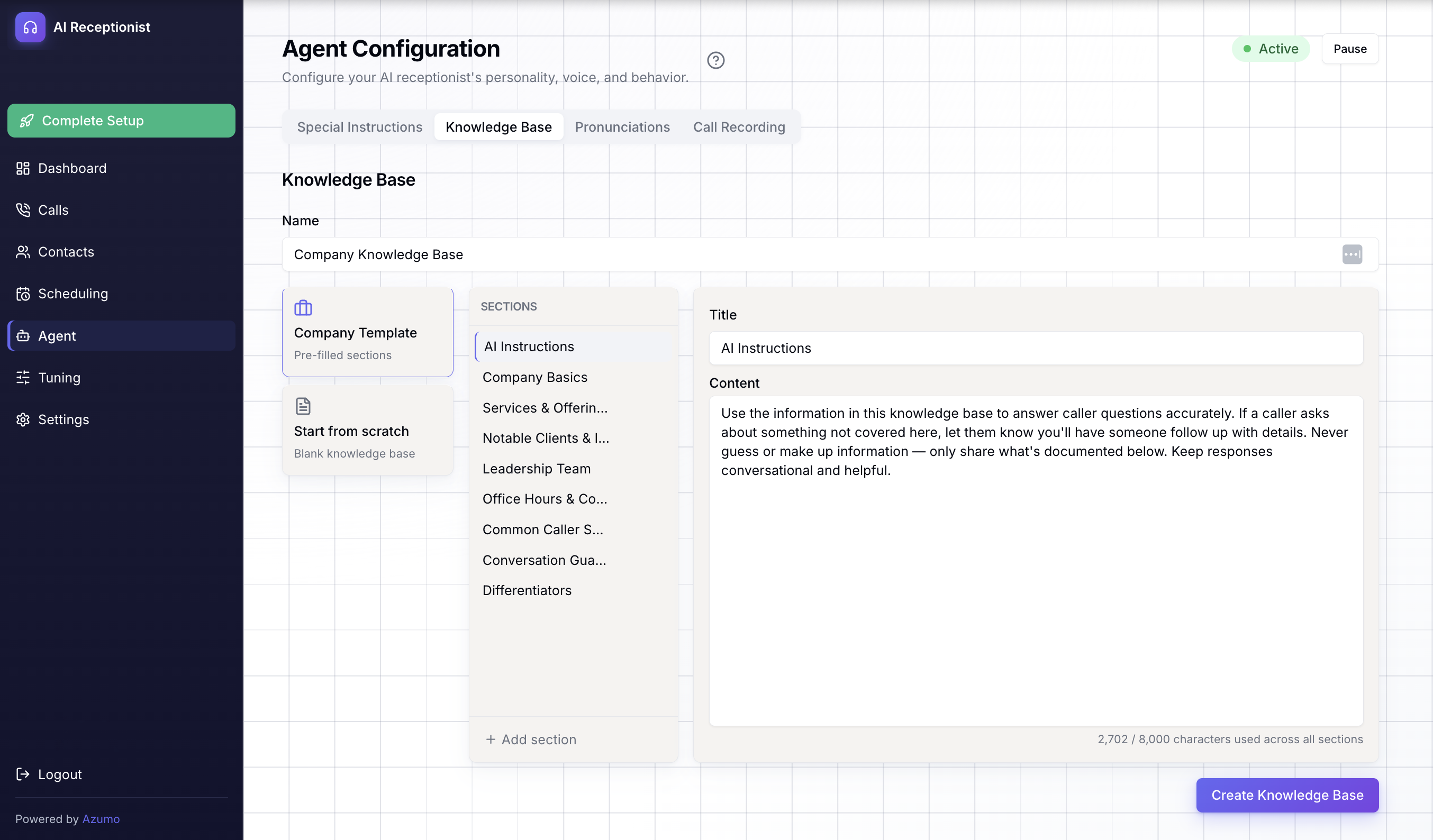
Knowledge Base

Add your services, hours, policies, and FAQs. The AI answers caller questions conversationally using this information. Updates take effect immediately.

SMS Notifications

Message notifications delivered via text to any phone number. For service businesses where a text message is the fastest way to reach someone on the job.

Zapier, Make & n8n Webhooks

Trigger automations from call events. A new caller can create a CRM contact, send a Slack alert, and draft an invoice automatically.

Active Call
0:42
Caller
Hi, I need to speak with Sarah please
AI Receptionist
Let me check Sarah's availability for you.
AI Receptionist
I've notified Sarah via Slack. Connecting you now.

Meet Your AI Receptionist

An AI that answers with your custom greeting, finds the right person using intelligent contact matching, and routes the call through Slack with real-time Accept/Decline buttons. If someone misses the initial notification, Late-Accept Recovery lets them pick up mid-conversation.

When no one is available, the AI collects structured messages with caller name, reason, callback number, and intended contact. Post-call intelligence generates summaries, sentiment analysis, and emotion tags automatically.

Every call is screened through three layers of spam protection before the AI picks up. You pay for real calls, not robocalls.

Missed Calls Cost More Than You Think

62% of small business calls go unanswered. Every one of those is a missed customer, a lost appointment, a prospect who moves on to your competitor.

After-hours calls? Entirely missed. Weekends? Silence. Traditional answering services charge $720/month for 200 minutes of human receptionist time and still round up to the nearest 30 seconds.

Callers who can't reach you don't leave voicemails. They call someone else.

By the Numbers

62%

of small business calls go unanswered. Your AI receptionist answers every one.

1.8s

median response time. Our P90 is faster than competing platforms' median.

$6,852

saved per year vs. traditional answering services at 200 minutes/month.

Complete Control Over Every Detail

Customize your AI receptionist's personality, voice, and behavior from a single intuitive dashboard.

AI Receptionist Dashboard Calls Contacts Scheduling Knowledge Base Agent Tuning Settings Margaret Genatios margaret.genatios@azumo.co Powered by Azumo Agent Agent Configuration Configure your AI receptionist's personality, voice, and behavior. Active Pause Prompt & Behavior Model Pronunciations Call Recording System Prompt Custom prompt The system prompt is auto-generated from your settings. The system prompt is automatically built from your agent name, company description, and other settings. Toggle "Custom prompt" to write your own. Identity & Greeting Agent Name Sara The name the AI introduces itself as. Welcome Greeting Hi, thanks for calling Maleleland! My name is Sara, how can I help you today? The first thing callers hear when the AI answers. Company Description Maleleland is a yoga and mindful movement brand centered on balance, strength, and inner awareness... Helps the AI answer questions about your business.

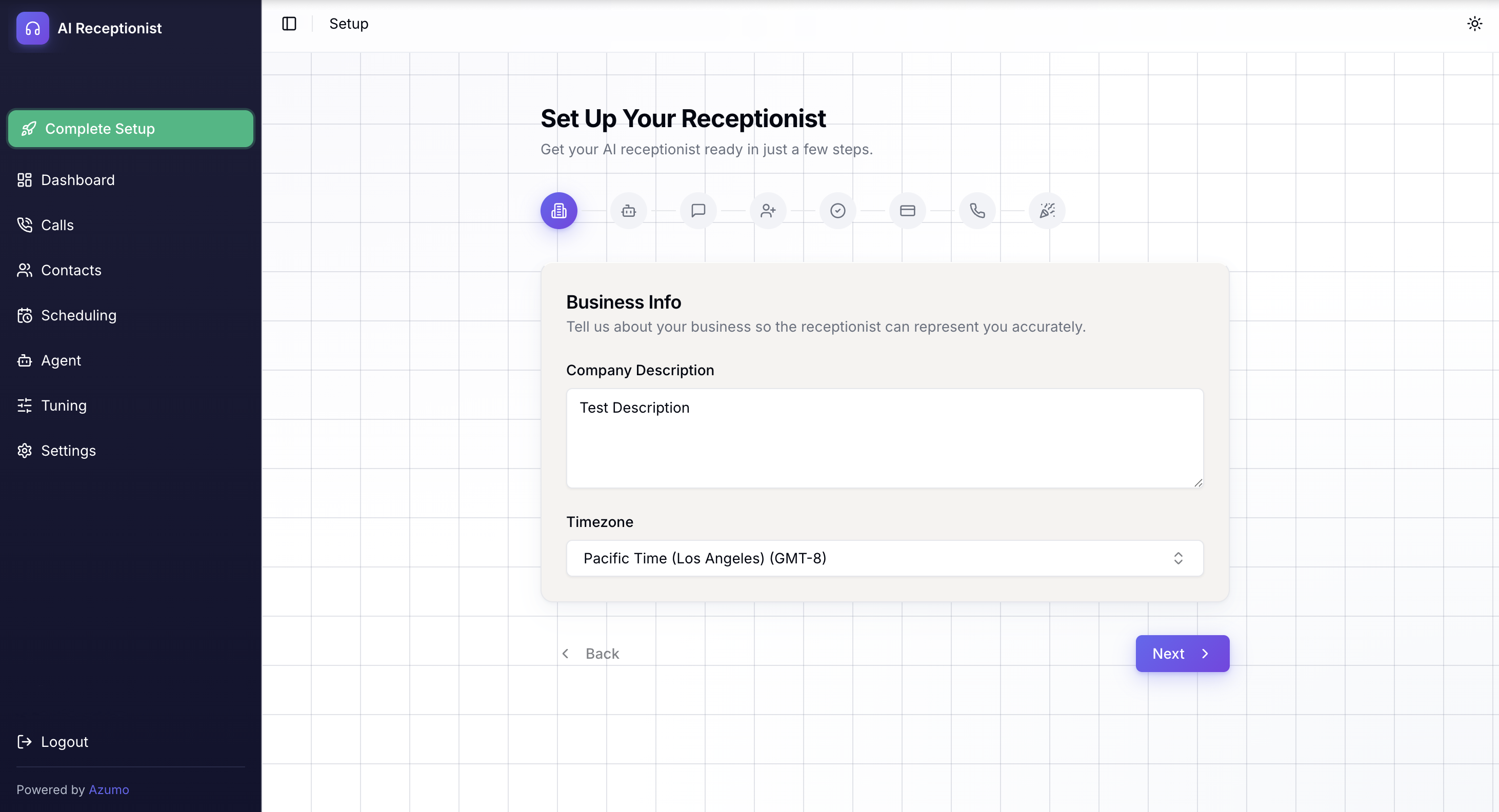
Tailor Your Agent's Identity

Set your agent's name, greeting, and company description so every caller gets a consistent, on-brand experience from the first second.

Configure dual-direction pronunciation for every team member. The AI says names correctly using TTS phoneme injection and recognizes them when callers say them through STT vocabulary boosting. Preview each pronunciation before going live.

Enable server-side call recording with a custom compliance disclaimer. Toggle recording on or off per tenant. Law firms, medical practices, and regulated businesses get compliance-ready dual-channel recording included, not as a per-call add-on.

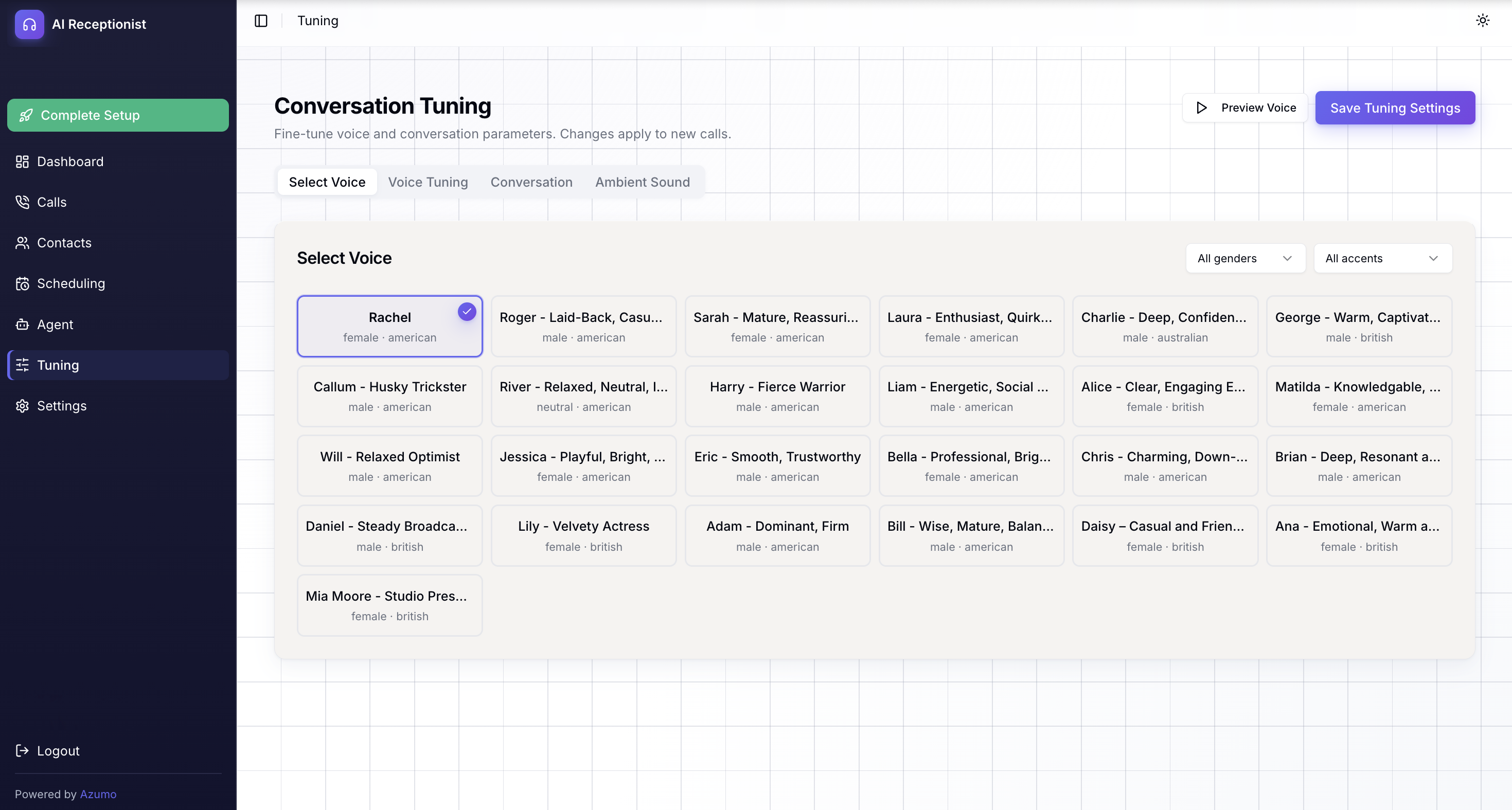
Pick the Voice That Fits Your Brand

Choose from over 25 high-fidelity voices spanning male and female options with distinct personalities — professional, warm, energetic, authoritative, and more.

Preview each voice before committing and fine-tune speech settings like language, endpointing sensitivity, and conversation pacing.

Your callers hear a natural, human-like voice that represents your business exactly the way you want.

AI Receptionist Dashboard Calls Contacts Scheduling Knowledge Base Agent Tuning Settings Margaret Genatios margaret.genatios@azumo.co Powered by Azumo Pipeline Tuning Pipeline Tuning Fine-tune your AI receptionist's voice, language, and conversation flow. Active Pause Voice Language Speech Conversation Endpointing Voice Choose a voice for your AI receptionist. K Kore Male · Professional M Myra Female · Friendly T Tina Female · Warm A Aoede Female · Crisp C Charon Male · Deep F Fenrir Male · Authoritative L Leda Female · Gentle O Orus Male · Calm P Puck Male · Energetic Z Zephyr Male · Breezy S Sulafat Female · Clear C Callirrhoe Female · Melodic A Algieba Male · Smooth A Autonoe Female · Bright D Despina Female · Lively E Erinome Female · Soft
AI Receptionist Call Tracking Call Analytics Today's activity and recent call log Feb 26, 2026 Total Calls 47 +12% Answered 39 83% Messages Taken 8 Avg Duration 1:42 Call Volume Last 7 days 20 15 10 5 0 M T W T F S S Recent Calls View all Caller Duration Status A Amanda Chen (415) 555-0142 2:15 Answered J James Hartley (212) 555-0897 1:03 Message S Sarah Mitchel (310) 555-0234 3:47 Answered M Mark Davis (628) 555-0511 0:58 Message

Track Calls and Cost Per Call

See every call in one place with full transcripts, AI-generated summaries, sentiment analysis, and outcome status. Know whether a call was answered, routed, or sent to voicemail.

Per-call cost tracking breaks down AI tokens, telephony, and speech services so you can calculate exact ROI. No estimated usage, no surprises. Managers spot frustrated callers immediately through sentiment tags and know which callbacks are urgent.

Manage Your Availability

Configure three modes per day: Live (full routing and transfers), Message Only (takes messages, no routing), and Voicemail. The AI switches behavior automatically based on your schedule.

Flip a single toggle and a team member stops receiving routing requests. Messages are taken instead. No failed transfer attempts, no interrupted vacations. Monday morning, your team has structured summaries of every call from the weekend.

Business Hours Active UTC-5 (EST) DAY HOURS MODE STATUS Monday 8:00 AM — 6:00 PM Live routing ACTIVE Tuesday 8:00 AM — 6:00 PM Live routing ACTIVE Wednesday 8:00 AM — 6:00 PM Live routing ACTIVE Thursday 8:00 AM — 6:00 PM Live routing ACTIVE Friday 8:00 AM — 1:00 PM Message only LIMIT Saturday 10:00 AM — 2:00 PM Message only LIMIT Sunday Closed Closed OFF

How AI Receptionist Works

Every call follows a structured flow from greeting to follow-up.

1

Greeting & Caller Name Collection

The AI answers with your custom greeting, asks "who may I say is calling?", and collects the caller's name before routing. Three layers of spam screening ensure only real callers reach the AI.

2

Contact Lookup & Intent Recognition

When a caller asks for someone, the AI runs fuzzy matching across names, aliases, and departments. Even misspelled or partial names resolve correctly. The AI identifies whether the caller needs routing, scheduling, or information.

3

Real-Time Routing with Late-Accept

The AI sends a Slack DM with Accept/Decline buttons while the caller waits. If the team member misses the 20-second window, the message transitions to an "I'm Available" button for mid-conversation pickup.

4

Scheduling or Structured Message Taking

The AI books appointments by checking Google Calendar in real time, or collects structured messages with five fields: caller name, reason, callback number, message, and intended contact.

5

Post-Call Intelligence & Delivery

Three AI analyses run in parallel: a concise summary, sentiment classification with emotion tags, and structured message extraction. Results delivered to Slack, Teams, Email, or SMS. Webhook automations trigger CRM updates, notifications, and follow-ups.

Live in Three Steps

No IT team needed. No hardware to install. Just configure, activate, and go.

1

Configure Your Receptionist

Set your greeting, voice, business hours, and contact directory. Add your knowledge base, configure pronunciations, and connect Google Calendar for scheduling.

2

Activate Your Number

Get your dedicated business number or port your existing one. Connect Slack, Teams, or email for notifications.

3

Calls Handled Automatically

Your AI receptionist answers calls, routes them to your team, takes messages, books appointments, and answers caller questions. Review everything in the dashboard.

What Changes for Your Business

The features above translate into real outcomes you can measure from the first week.

Every Caller Gets a Professional Experience

  • Callers reach the right person even with misspelled or partial names through intelligent fuzzy matching
  • Team members know who's calling before they pick up, with full context in the Slack notification
  • After-hours callers get structured message-taking, not a generic voicemail box
  • Names are pronounced correctly in both directions: the AI hears them and says them right

More Live Connections, Less Phone Tag

  • Real-time Slack routing with Accept/Decline buttons connects callers in seconds, not hours
  • Late-Accept Recovery lets team members pick up mid-conversation even after the routing timeout
  • Contact active/inactive toggle ensures callers still get handled when someone is unavailable
  • Three business hour modes switch automatically so behavior matches the time of day

Full Visibility Into Every Call

  • Post-call intelligence generates summaries, sentiment analysis, and emotion tags automatically
  • Per-call cost tracking breaks down AI tokens, telephony, and speech services for exact ROI
  • Structured messages with five extracted fields mean nothing falls through the cracks
  • Server-side call recording with custom compliance disclaimers for regulated industries
  • Multi-tenant admin with role-based access control keeps configuration safe from accidental changes

Works With Your Existing Tools

Notifications arrive where your team already works. Webhooks connect to your CRM, invoicing, and project management tools automatically.

Slack

Get DMs with accept/decline buttons for call routing. Messages delivered to your chosen channel.

Microsoft Teams

Receive message notifications via webhook. Stay in the tools your team uses every day.

Email

Message notifications sent to the addresses you configure. Simple, reliable delivery.

Google Calendar

Connect team calendars via one-click OAuth. The AI checks availability and books appointments during calls.

SMS

Message notifications via text to any phone number. Ideal for service businesses where a text is the fastest way to reach someone on the job.

Zapier, Make & n8n

Webhook integrations trigger automations from call events. Connect to your CRM, invoicing, and project management tools.

Enterprise-Grade Security. Standard.

  • SOC 2 compliant infrastructure
  • HTTPS/TLS encryption in transit, AES-256-GCM at rest
  • Complete data isolation per tenant
  • Multi-tenant RBAC with super admin, admin, and read-only roles
  • Server-side call recording with custom compliance disclaimers, off by default
  • STIR/SHAKEN caller verification and DTMF robocall gate

Common Questions

How long does setup take?
Under 30 minutes. You configure your greeting, voice, business hours, and contact directory from the web dashboard. No technical expertise required.
Is there a free trial?
Yes. A 7-day free trial with included minutes and full feature access. Real calls, real routing, real summaries. Card on file from day one with no surprise charges. Easy cancel if it's not the right fit.
How does pricing work?
Plans start at $79/month for 100 minutes (Starter) and $149/month for 200 minutes (Pro). You only pay for the minutes you use, billed to the exact second. Per-call cost tracking breaks down AI tokens, telephony, and speech services so you can calculate exact ROI.
How does call routing through Slack work?
When a caller asks for a team member, the AI sends an instant Slack DM with Accept and Decline buttons while keeping the caller on the line. Your team decides in real time whether to take the call. If someone misses the 20-second window, the message transitions to an "I'm Available" button so they can still pick up mid-conversation.
What happens after hours?
Three modes per day of the week: Live (full routing and transfers), Message Only (takes messages without routing), and Voicemail. The AI switches automatically based on your schedule. Monday morning, your team has structured summaries of every call from the weekend.
Does it record calls?
Server-side call recording is available with custom dual-channel audio (caller and bot mixed into a single WAV). You configure the compliance disclaimer and toggle recording on or off per tenant. Recording is included in your plan, not a per-call add-on.
What happens after a call ends?
Three AI analyses run in parallel: a concise summary, sentiment classification with emotion tags and key quotes, and structured message extraction with caller name, reason, callback number, message, and intended contact. Your team acts on messages faster because everything is organized and actionable.
How does the AI handle names it hasn't heard before?
The AI uses weighted fuzzy matching across names, aliases, and departments. Even misspelled, partial, or nickname-based requests resolve correctly. You also configure custom pronunciation using phonetic respelling or IPA notation, and the AI recognizes names through STT vocabulary boosting.
Can the AI schedule appointments?
Yes. Connect a team member's Google Calendar and the AI checks availability in real time during calls. Custom appointment types with durations and buffer times. Calendar invites sent automatically. More appointments booked, fewer no-shows.
How does spam filtering work?
Three layers: a blocked number list, STIR/SHAKEN caller verification, and an optional DTMF robocall gate that requires callers to press 1 to continue. Automated dialers hang up before the AI even answers. You pay for real calls, not spam.
Can I connect it to my CRM or other tools?
Yes. Webhook integrations connect to Zapier, Make.com, n8n, and thousands of other apps. Trigger automations from call events like new message taken, call completed, or appointment booked. Notifications also go to Slack, Teams, Email, or SMS.
Is my data secure?
SOC 2 compliant with complete data isolation per tenant, HTTPS/TLS encryption in transit, AES-256-GCM encryption at rest, and role-based access control with three permission levels. Team invitations via secure email links. No customer can see another customer's data.

Stop Missing Calls. Start Today.

7-day free trial with full feature access. Real calls, real Slack routing, real sentiment analysis. Set up in under 30 minutes. No long-term contracts.

Plans start at $79/month after trial

Talk to Our Receptionist